- Published on
CausalFlow: A Visual Workbench for Bayesian Networks
- Authors

- Name
- Shuqi Wang
Setting different evidence values and watching the posteriors change in real time.
Why I Built This
During a course on probabilistic graphical models, I kept running into the same problem: the tools for working with Bayesian Networks were either (a) behind a MATLAB paywall, (b) ancient Java desktop apps from 2008, or (c) pure Python libraries that assumed you'd never want to see your network.
I wanted something simple — open a browser, drag some nodes around, draw arrows, set evidence, and instantly watch the probabilities ripple through the graph. Like a flight simulator for causal reasoning.
So I built CausalFlow.
What It Does
CausalFlow is an open-source, browser-based workbench for building, training, and querying Bayesian Networks. You can go from raw CSV data to a fully interactive causal model in about 30 seconds.
The core loop is: Build a DAG → Define probabilities → Set evidence → Read posteriors.
Three Ways to Build a Network
The tool supports three distinct workflows, depending on what you're starting with:
1. Data-Driven — You have a CSV dataset.
Upload your file, and CausalFlow auto-detects discrete variables and state spaces. Then either use the built-in Hill-Climbing algorithm to discover structure from data, or draw edges manually. Parameters are fitted via Maximum Likelihood Estimation.
2. Expert Knowledge — You have no data, but you understand the domain.
Create nodes from scratch, define their states (High, Low, Normal), assign prior probabilities, and draw the causal arrows. CausalFlow automatically generates sensible conditional probability tables (CPTs) based on the structure you specify. You can also open the CPT Editor to fine-tune exactly how a parent influences its child.
3. Hybrid — You have some data and some intuition.
Upload a CSV to bootstrap the network, then add expert nodes with manual priors. Wire them together. The system handles the rest.
A Walkthrough
Let me walk through a typical session to show how the pieces fit together.
Step 1: Start with a Clean Canvas
When you first open CausalFlow, you get an empty infinite canvas with a sidebar. The sidebar is your control panel — upload data, add nodes, and manage your workflow from here.

The starting canvas. Everything begins here.
Step 2: Build Your Graph
There are two paths here. If you uploaded a CSV, the nodes appear automatically based on your data columns. Otherwise, click "Add Node" and define it manually — give it a name, list its possible states, and optionally assign a prior probability distribution.

Once your nodes are on the canvas, draw edges between them by dragging from one handle to another. Each edge represents a causal claim: "this variable directly influences that one."
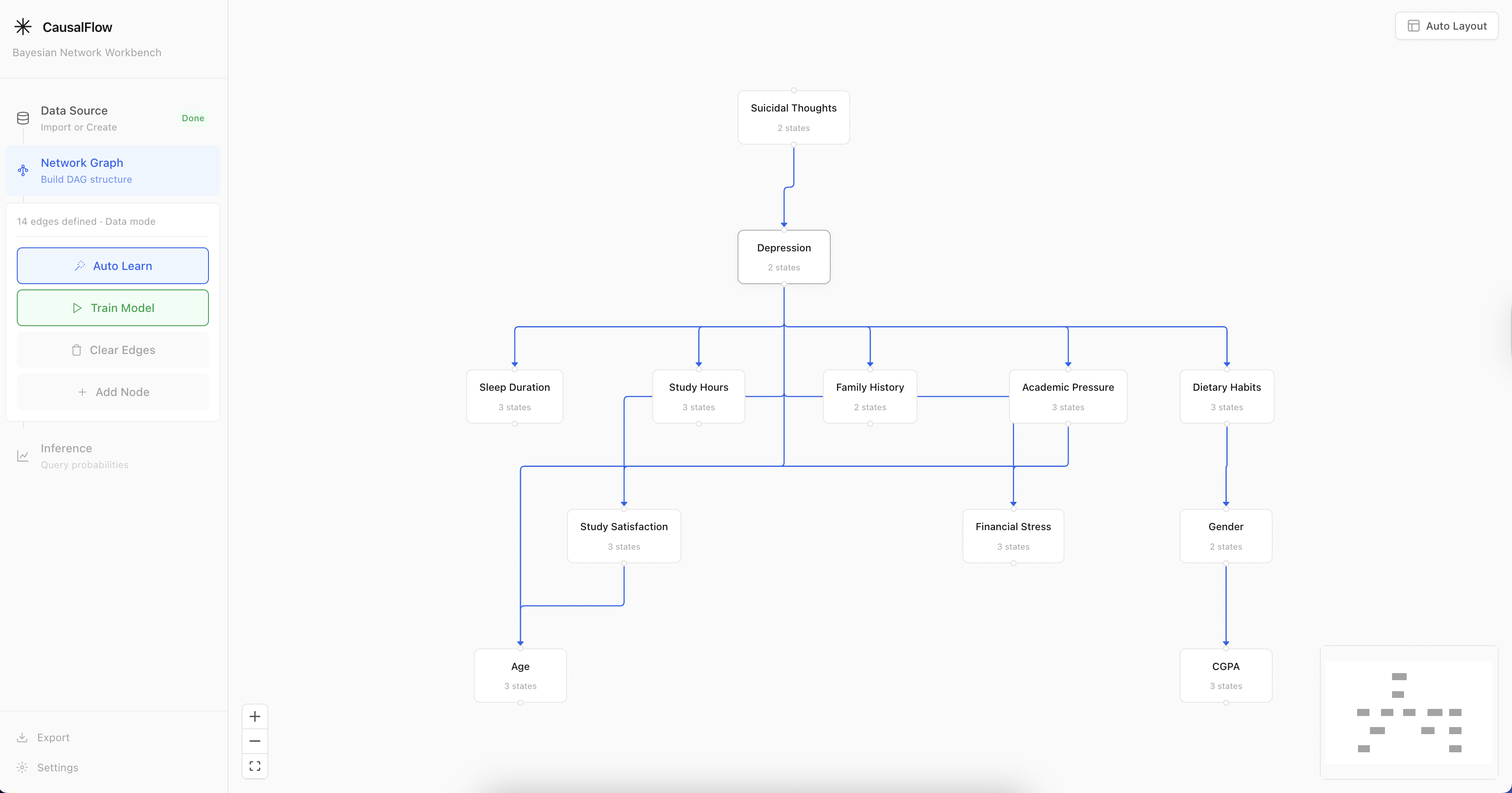
Constructing a DAG by connecting nodes. The sidebar shows each node's states and priors.
The layout can get messy fast. Hit the auto-layout button and Dagre will organize everything into a clean, hierarchical structure.
Step 3: Train & Infer
Click "Train Model" to compile the network. Behind the scenes, CausalFlow builds a proper pgmpy Bayesian Network — constructing conditional probability tables for every node, validating the DAG, and initializing the Variable Elimination inference engine.
Now the fun part: click any state on any node to set it as evidence. The moment you do, every other node's probability distribution updates in real-time. You can observe exactly how information propagates through your causal graph.
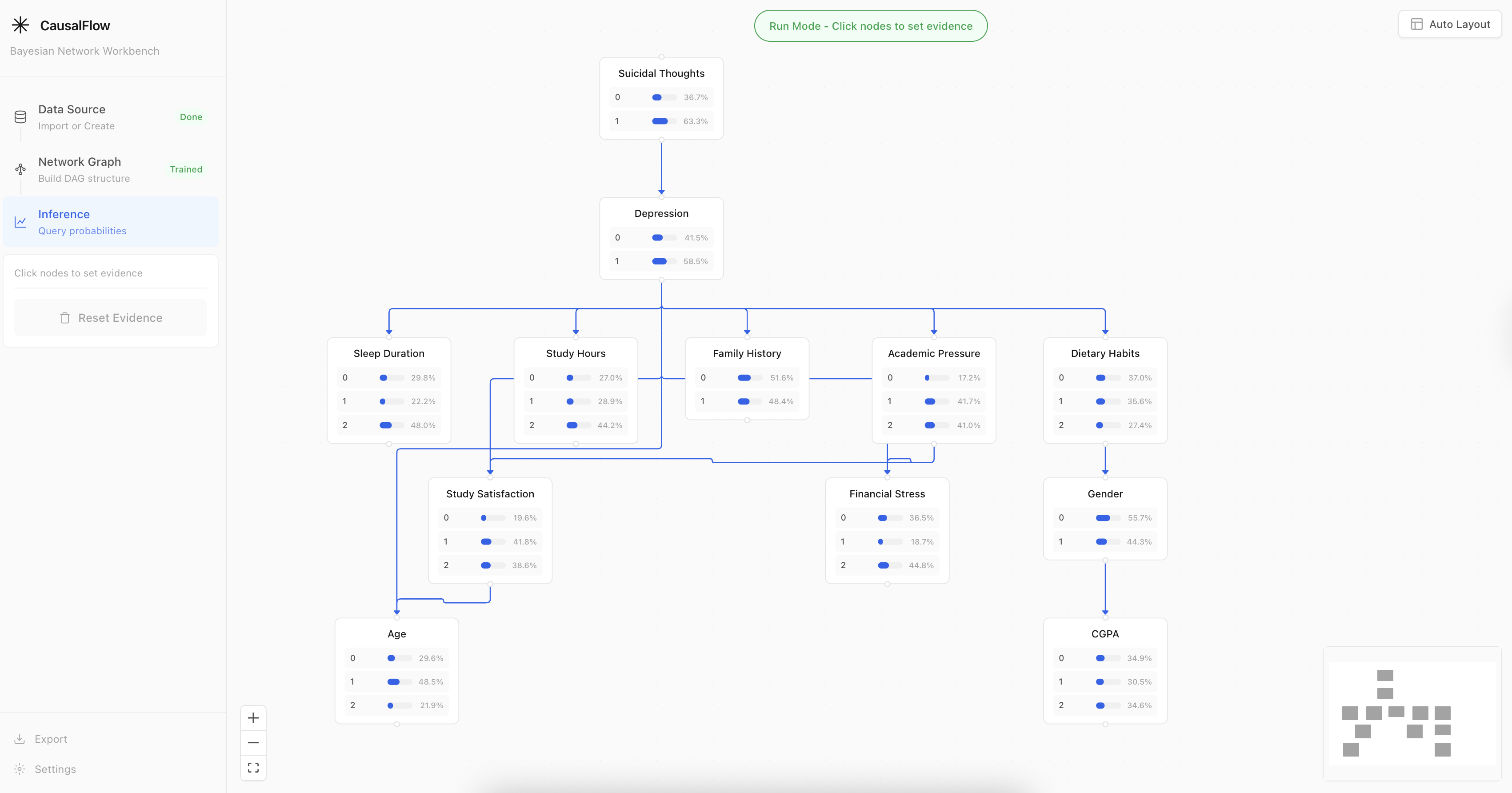
After setting evidence, posterior probabilities update across the entire network.
And here's the evidence propagation in action:
Setting different evidence values and watching the posteriors change in real time.
Under the Hood
For those curious about the architecture — CausalFlow is a React + FastAPI application. The frontend handles all the visual/interactive work, and the backend runs the actual probabilistic inference.
┌─────────────────────────┐        ┌──────────────────────────┐
│       Frontend          │  REST  │        Backend           │
│                         │◄──────►│                          │
│  React 19 + React Flow  │  API   │  FastAPI + pgmpy         │
│  Zustand · Tailwind     │        │  Variable Elimination    │
│  Dagre · Recharts       │        │  Hill-Climbing (BIC/K2)  │
└─────────────────────────┘        └──────────────────────────┘
A few implementation details that might be interesting:
- Causal CPTs: When you draw an edge, CausalFlow generates a default CPT with a 0.7 strength factor — meaning edges have a visible causal effect out of the box. The parent's i-th state biases the child toward its i-th state. This is deliberate: if you draw an arrow, you should see it do something.
- CPT Editor: If the defaults don't match your domain, you can open the CPT editor on any child node and dial in the exact conditional probabilities yourself. Full table UI with real-time sum validation.
- Structure Learning: The Hill-Climbing algorithm evaluates candidate structures using BIC or K2 scoring, starting from an empty graph and greedily adding/removing/reversing edges until the score plateaus.
Quick Start
Try it online — no setup needed:
Or run it locally:
git clone https://github.com/shuqiwhat/causal-flow.git && cd causal-flow

# Backend
cd backend
python -m venv venv && source venv/bin/activate
pip install -r requirements.txt
uvicorn main:app --reload        # → http://localhost:8000

# Frontend (new terminal)
cd frontend
npm install && npm run dev        # → http://localhost:5173
Docker:
docker compose up -d --build # → http://localhost
What's Next
There's a lot I still want to do:
- Visual link strength — Render edges as thick/thin based on the magnitude of the CPT's causal effect.
- D-separation queries — Let users visually test conditional independence.
- Export/Import — Save and share network definitions as JSON.
- Sensitivity analysis — How much does changing one CPT entry shift the final posterior?
If any of this sounds interesting, PRs are welcome. The repo is here.
The best way to understand Bayesian Networks is to play with one. I hope CausalFlow makes that a little easier.